Showing posts with label software. Show all posts

27 May 2015

Tutorial: How To Enable Firefox Optional Tracking Protection To Reduce Load Times of Major News Sites By 44%.

Former Mozilla software engineer Monica Chew and Computer Science researcher Georgios Kontaxis has found that news sites does indeed load slower with tracking mode on in your browser. For more you can read news from Venturebeat.

If you turn on Firefox's Optional Tracking Protection you can reduce the load time of major news sites by 44%. 

So, lets get that thing turned on.


Follow these steps:
1. Start Firefox and open about:config in the address bar
2. Search for privacy.trackingprotection.enabled
3. Double-click or right-click the preference to toggle the Value to “true”


Read More »

14 April 2015

WINDOWS: NetLimiter- Limit Your Bandwidth Or Internet Speed In Windows

NetLimiter is piece of software for windows operating system to control your bandwidth speed. We all have come across situations where one connection is shared between many users and the speed falls whenever someone downloads a file or watches a youtube video.

This software puts a limiter or control on the software you have on your pc so that everyone can enjoy a stable connection. You can manage how different software are allocated different speeds.


1.You can download the software here: Download
2. Be patient the installation takes a little bit of time. But not that long.


Stay updated for a post on how to control bandwidth speed on android.


Read More »

11 April 2015

F.lux: Protect Your Eyes at Night and Sleep Better (Windows, Linux, Mac, Iphone/Ipad)

We all read a lot via our electronic devices at night. Many research have correlated sleep disorder with prolonged use of Electronic device. Here are the list of information regarding the research: Click Here

One solution to this problem is to warm up your display like the warm red color sky we see around sunset. There is a soft specifically designed to mimic this scenario. It's called F.lux

F.lux

is the best way to protect your eyes when using electronic devices either via your desktop pc, latop or mobile device. They don't current have it for android yet. But, there are various alternatives for android like Lux , Twilight, etc. 


I have set up F.lux on my Windows Laptop. Below you will see the difference in screen color when the app is running and not.


Click this link to download F.lux from the developers website directly or https://justgetflux.com to go to their website otherwise.


Read More »

1 January 2015

Disable Tab Animation and Speed Up Firefox Browser (PC)

Whatever I do with my very slow machine, the tab animations in firefox when shifting between tabs just makes my pc hang a lot. So, I found out that there is a way to shut it off and make the browser surfing experience faster.

SO HERE ARE THE STEPS:

1. Type     about:config    in your address and press enter


2. You will get the following window:


3. You may click  I'll be careful  button.

4. In the search box type    browser.tabs.animate    and hit enter. You get the picture below. Here the value is true which means the tab animation is turned on. Double click on it and it will be turned to false.


That's it. You may have made your firefox browser a little faster or more.
Thank you for reading.
Read More »

31 December 2014

How to Fix This Connection is Untrusted When Opening Facebook.com in Firefox or Chrome 31 Dec 2014

Today, I got and error in Firefox and Chrome when trying to acces www.facebook.com like in the pictures below:

The Errors were:

 This Connection is Untrusted
 Your connection is not private 
  Error code: ssl_error_bad_cert_domain

The problem seems to be caused  by the OPEN dns server that I was using. Recently, modern browsers started using HSTS which is a more secure way of browsing which is like an upgrade to HTTP. IT even gave me errors like the site has been blocked by your network administrator.


Anyway, I got the problem fixed by changing my laptop and router's dns to google dns instead of the open dns that i was using before.


Here are the steps to change the dns in your laptop to google dns:

Open control panel-Network and Internet-Network and Sharing Center
Click on your internet connection (I clicked Wifi (jan de wit) as in the pic) and you will get something like this (I am using wifi):


Click Properties and in the pop up window that come up select Internet Protocol Version 4 and select properties there.


Here change the following to this like in the picture and make sure that you do not touch or change anything else:

Preferred dns server:   8.8.8.8
Alternated dns server: 8.8.4.4

Those numbers are the google dns server.


Click ok and exit.

Open browser and open facebook. The problem would have been fixed by now.


That's it!


And BTW, Happy New Year to all! Have a great upcoming year!
Read More »

6 December 2014

VLSub: VLC addon for finding subtitles for Windows Linux and Mac OS X

Well, you don't have to open a website every time you want to download subtitles for your movies. VLSUB is an excellent tool if you are using VLC as your default player in your pc or laptop to download subtitles directly from the software app itself.

After placing the extension file in the right directory and location, you can just open up VLC and go to View and select VLSub. Then, you will get an options to search using file name or hash file. Filename has worked best in my case.


I just found the source myself from this: Link Source

Installation process for windows 64 bit(worked in my machine):
1. Download this file and extract it: Extenstion File VLSub.zip
2. Move the "VLSub,lua" file to %ProgramFiles%\VideoLAN\VLC\lua\extensions\


3. Close VLC and restart it again.
4. All done. To look for subtitles, in VLC, go to 'VIEW' and Select "VLSUB". You can take it from there then.

FROM THE source:

INSTALLATION:
- click on the download button below
- save the archive and extract the file "vlsub.lua"
- create a directory "extensions" at this location and put the file "vlsub.lua" inside:
Windows (all users): %ProgramFiles%\VideoLAN\VLC\lua\extensions\
Windows (current user): %APPDATA%\vlc\lua\extensions\
Linux (all users): /usr/lib/vlc/lua/extensions/
Linux (current user): ~/.local/share/vlc/lua/extensions/
Mac OS X (all users): /Applications/VLC.app/Contents/MacOS/share/lua/extensions/
Mac OS X (current user): /Users/%your_name%/Library/Application Support/org.videolan.vlc/lua/extensions/

...or use the installer below if you're on Windows 7 (32 or 64)

To start the extension click on View > VLSub or Vlc > Extensions > VLSub on Mac OS.


Read More »

2 December 2014

Google Keyboard 4.0.2 Apk update now let you choose White and Material theme. +some more

The latest release of google keyboard now lets you choose Material Dark theme and White White Theme along with the usual old theme also. Now, try the other white theme look. See the pics below
Here is the apk file link
Google Keyboard 4.0.2 apk ( DevHost)
Stay tuned for more.
And by the way, Screenshots are provided below .


Read More »

1 December 2014

Self Control- App to to get you off your phone and Study.(My daily driver)


I have been there. Constantly checking my phone again and again while I sit in my study table. I soon realize I have only studied a little. Those little distractions can take you mind off somewhere and actually make serious study harder.
Different people study in different ways. Silent type, murmurful ones, skippers, music mutitakers, and so on. As for me, I get frustrated when people are too noisy. And also the distraction of the 'smartphone' affects me a lot.
You check your phone for a few seconds and you realize an hour has passed by and so on the day passes away and years.
I'm not telling you to abandon your smartphone. That would be bad of me. Rather try this app called ' Self Control'.
With this app you can do this
  - set a timer
  - activate it
  - during the whole duration you won't be able to use your phone. Whatever you do the app will pop up and take you off. 

You may set up preferences to allow access to certain apps before you activate it. But I just have them all cut off.
See the screenshots below. Download apk link will also be provided below. Its a free app. Thanks! And all the best for your studies.
Play store link


Read More »

13 November 2014

Install Android L Play store On Any Phone (No root Required)

Once again, Google Play Store app has been ported from Android Lollipop. I have personally tested and it works well in my phone, which I did without root.
If you want the Android L materialistic look on your android phone in play store app, then go ahead and download the apk file attached below install it like any other apk file.
The apk version is Play Store 5.0.31 apk. Do check out the screenshots provided below to see how it looks.


And don't worry at all. This will not do any harm to your device because you just have to install like any other app. But, please, everything you do is at your own risk.


Read More »

8 November 2014

Install Android L Keyboard on Any Android Non-rooted Phone

It's not long before apps from the latest version of Android are ported to all other versions of Android. Some require root and some don't. But, here in the case of Android L Keyboard you can just make it work in your device without root.
Xda senior member, asdfzz, has modded the app, and now it may just work on any device. I tested it on Lg pro lite dual and it worked. Someone has tested it on Moto G running 4.4.2 without root and it worked there.
You can find the original source of the thread here: link


Installation:
  - uninstall the google keyboard if you installed it from play store before.
  - Just install the apk provided below like any app installation. It is simple as that.
  - after installing you have to do one more thing. Change the color scheme( You have to go to Google Keyboard settings, then Advanced Settings, and lastly change
the "Color scheme" to "Material" .
Download apk :
  - link 1 http://d-h.st/YmI
  - link 2 mediafire
As the source says, phones such as Stock Nexus without root may have problems with this app as it already has got google installed  keyboard as system app. 
But for those you may need to delete the system app file and install.


For rooted phone check this link for another tutorial to install on rooted phones : LINK
Read More »

6 November 2014

Android L Google Keyboard Installation on Redmi 1s running MIUI v45.

Android L Google Keyboard on Redmi 1s running MIUI V45 global version with Material Theme Installation Tutorial.
Recently, I found  a way to install google l keyboard in my redmi 1s running global version v45. After installing I enable the material theme by going to 'settings-language and input- google keyboard setting- advanced options- color scheme- meterial'
You need root for this.
Method 1
  - flash it using cwm or any recovery


Method 2
  - extract the file.
  - install the apk that is in system/app folder in the extracted folder.
  - copy the .lib file to system/lib and change permission to rw-r--r--. (Make sure you do this otherwise it will foreclose).

Lastly, do this for material theme.
After installing enable the material theme by going to 'settings-language and input- google keyboard setting- advanced options- color scheme- meterial'
See the pictures and you will understand.
Warning: I am not responsible if you brick your device. Do it at your own risk.


source: http://forum.xda-developers.com/showpost.php?p=53709980&postcount=52
Read More »

5 November 2014

MKV-720p File Playback Review of MX player, Dice Player, BS player and VLC Beta player

I have tested a MKV file playback in my phone, Redmi 1s, with all of the popular android video players, MX player, Dice Player, BS Player, VLC Beta. And the results are given below.


File Info
Name : Dawn of.
Resolution : 1280 * 688
Frame rate : 23.97
Format : MKV


None of them can play it. MX player could play but the audio and video are not in sync. Dice player gave an error when trying to play it. Vlc beta played but stuttered here and there with pixilated colors like an old worn dvd. Bs player was next to Mx in term of playback.

I tell you, you just wouldn't enjoy watching the video
with any of the above players and many that are out there.

Update: Km player can't play the file
Rockplayer 2 can't even open the file.


Read More »

2 November 2014

How to bypass "Inbox By Gmail" invite.

Inbox by gmail is out but still not there for all to access and try. This article is a trick that has been confirmed to work in case you want to skip invite approval by google and use the app instantly. ( Inbox by gmail trick bypass without waiting working trick as verified by friend).
NOTE: this will only work if one device has already got the invite and the app installed.
The method is such that the approved account will be used to add unapproved account (of your friend, for example).
Step 1.
Add the unapproved gmail a/c to the approved gmail a/c user phone.
Suppose A has been approved. Then, add B's (unapproved a/c) to A's phone, (by going to settings, add account, google, existing, then password and username). Deselect all sync options when the choice prompt comes up.


Step 2.
Open the app ( Inbox by Gmail) in A's phone. There in the sidebar option inside the app, you will find an option to change account. Shift from A to B a/c.
Step 3.
Wait for some time. B's a/c should have been approved by now.
Step 4. Check now in B's phone. If it is approved, then simply delete B's a/c in A's phone by going to settings, account, remove ( Press Menu and you will find the option of removal when you are in B's a/c settings.
Wolla! Hope it works well forever.
Thanks for reading.
My facebook page- AndroidScientists


Read More »

31 October 2014

Send Pictures Now Using Wifi in Quickpic

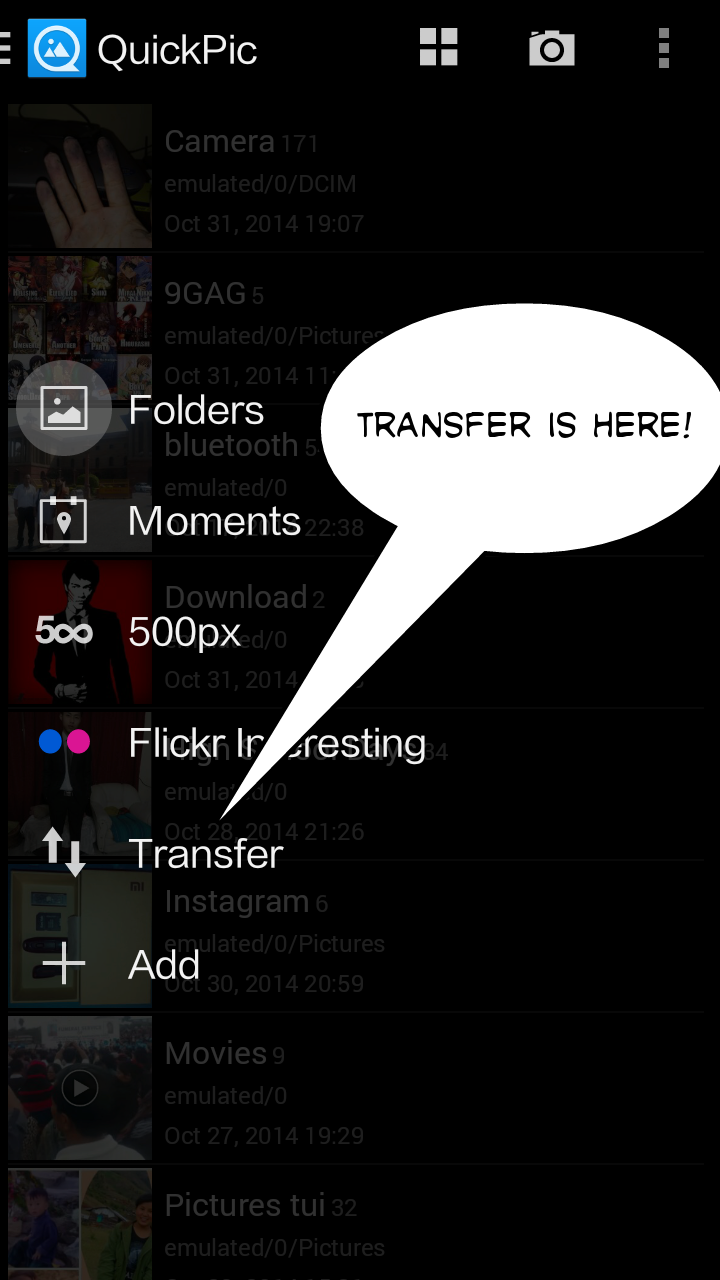
Quickpic has recently been updated with additional feature for sharing pictures using your WiFi. This feature can be accessed using the  "Transfer" option in the app. I have attached photos for a preview in case you are interested.
We have come across times where we wanted to share a lot of pictures via Bluetooth but couldn't due to the slow speed and vastness of the file size.
And also app like Fast File transfer is cumbersome and buggy when trying to send using WiFi. I have been there. But, now there is a solution to all of it
TRANSFER in Quickpic


1. What you do is click the transfer option in quickpic (screenshot provided).
2. Select the photos you want to share.
3. Select the user you want to share ( the recipient must also be in Transfer Mode ( which is step 1).
4. Just wait. Files will be send using wifi.
5. Precaution: Keep the WiFi of both devices turned on before sharing ( just a precaution I take for errorless and easy sharing).
All done!
Here is the apk:
Quickpic-Zippyshare link
Or
PlayStore Link
Thanks for reading!


For more posts and updates like our page
www.facebook.com/droidscientists
Read More »

4 September 2014

how to take screenshot in windows 7 and windows 8.

windows 7 :

Press prtScr (printscreen) located inbetween F12 and delete.


open paint and press control +v save it.


windows 8:

press windows button and prtSc simultaneously.

 
Read More »